WireGuard is extremely simple yet fast (faster than OpenVPN) and modern VPN that utilizes state-of-the-art cryptography. WireGuard is available to most platforms, originally being part of the Linux kernel, you can always count on it. On Debian you can install it with: apt-get install wireguard.
Generate the client's key-pair:
cd /etc/wireguard
umask 077
wg genkey | tee priv | wg pubkey > pub
Copy the client's private key of the priv file and create a configuration file with the following:
[Interface]
PrivateKey = <private key that you copied>
Address = 10.0.0.2/24

[Peer]
PublicKey = <server's public key>
Endpoint = <server's public ip address>:51820
AllowedIPs = 0.0.0.0/0
Note that the interface's address needs to be inside the server address range and unique.
Once you have the server's interface up you can enable the client's with:
wg-quick up wg0
To pass the client's traffic through the server it is necessary to enable IP forwarding. Open the file /etc/sysctl.conf and uncomment the line net.ipv4.ip_forward=1. Then, to apply, run sysctl -p.
sed -i '/ip_forward/s/^#//' /etc/sysctl.conf
Now generate the server's private and public keys:
cd /etc/wireguard
umask 077
wg genkey | tee priv | wg pubkey > pub
Copy the private key of the priv file and create a configuration file containing:
[Interface]
PrivateKey = <private key that you copied>
Address = 10.0.0.1/24
ListenPort = 51820
PostUp = iptables -A FORWARD -i wg0 -j ACCEPT; iptables -t nat -A POSTROUTING -o eth0 -j MASQUERADE
PostDown = iptables -D FORWARD -i wg0 -j ACCEPT; iptables -t nat -D POSTROUTING -o eth0 -j MASQUERADE

[Peer]
PublicKey = <client's public key>
AllowedIPs = <client's interface specified address>
PersistentKeepalive = 25
Enable the interface:
wg-quick up wg0
To enable the interface at boot: systemctl enable wg-quick@wg0.
If you are using ufw you may need to allow 51820/udp.
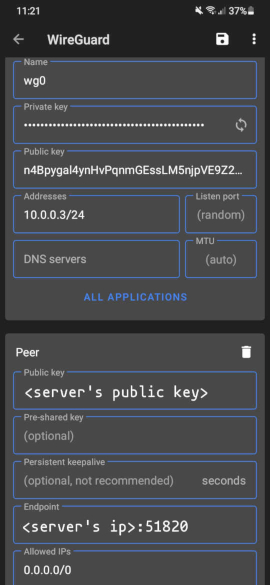
You can get the app from Google's Play Store or from F-Droid, preferably the latter. Inside the app, create a new configuration like: